What is eDPI? How to calculate it and why it stays inside one game
Updated October 13, 2026 · 5-minute read · 6 sections
A Valorant player at 280 eDPI and a CS2 player at 891 eDPI turn exactly the same distance on the mouse pad. If that sounds wrong, you have met the most common misunderstanding about eDPI: it is a great number for comparing players in one game and a useless one across games.
What eDPI means
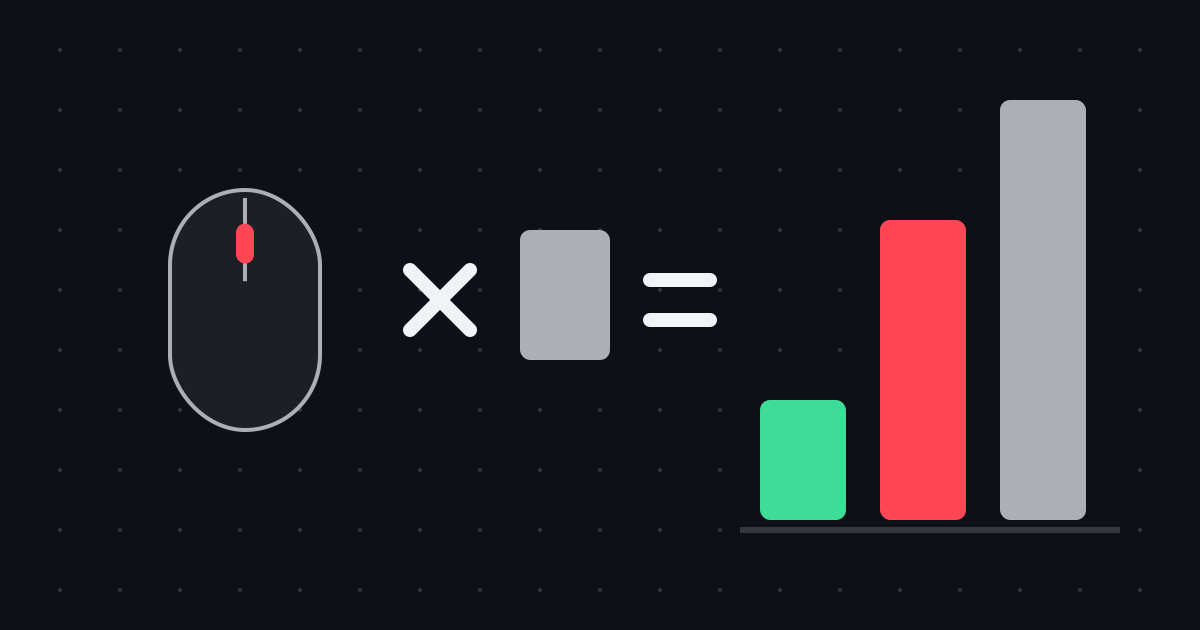
eDPI, effective DPI, folds your two settings into one number:
It exists because the same feel can be written many ways. In CS2, 2.0 at 400 DPI, 1.0 at 800 DPI and 0.5 at 1600 DPI are all 800 eDPI and all give the same 51.95 cm for a full turn. Telling someone "I play 1.0" means nothing until they know your DPI; "800 eDPI in CS2" is complete.
The catch is hidden in the word "in-game". eDPI uses the number from the settings menu, and each game's menu number means a different amount of turning.
How to calculate your eDPI
- Open your mouse software and read the active DPI (some apps call it CPI). If the mouse has DPI stages, check which stage is lit, not the list of presets.
- Open the game settings and read the hipfire sensitivity. In Fortnite use the X value, and make sure X and Y match.
- Multiply: sens × DPI. CS2 1.1 at 800 DPI is 880 eDPI. Valorant 0.35 at 800 is 280. Valorant 0.7 at 400 is also 280.
- Write it down with the game name. "880 eDPI" alone is half the information.
That is it. There is no rounding to worry about, and DPI cancels the way you would expect: double the DPI, halve the sens, same eDPI.
Why eDPI only compares inside one game
Each game turns your view by its own number of degrees per mouse count, called yaw. CS2 uses 0.022°, Valorant 0.07°, Overwatch 2 0.0066°. eDPI ignores yaw, so the same hand movement produces very different eDPI values. Here is one cm/360 written as eDPI in three games:
| cm/360 | CS2 / Apex eDPI | Valorant eDPI | Overwatch 2 / CoD eDPI |
|---|---|---|---|
| 25 | 1662.5 | 522.5 | 5541.8 |
| 30 | 1385.5 | 435.4 | 4618.2 |
| 40 | 1039.1 | 326.6 | 3463.6 |
| 50 | 831.3 | 261.3 | 2770.9 |
| 55 | 755.7 | 237.5 | 2519.0 |
Each value is 360 × 2.54 ÷ (cm × yaw). For 40 cm in CS2: 914.4 ÷ (40 × 0.022) = 914.4 ÷ 0.88 = 1039.1. Valorant's number is always 3.18 times smaller than CS2's, Overwatch 2's always 3.33 times bigger.
If you do want to move an eDPI from one game to another, scale it by the yaw ratio: eDPI in the new game = old eDPI × old yaw ÷ new yaw. Valorant 280 × 0.07 ÷ 0.022 = 890.9 in CS2. The sensitivity converter does this and shows both eDPI values side by side, labelled so nobody compares them directly.
The ranges people quote
Pro settings lists are where eDPI shines, because everyone in the list plays the same game. The averages commonly quoted, for example on csdb.gg, put most CS2 players roughly between 600 and 1200 eDPI (average around 860) and most Valorant players between 200 and 400 (around 280). Converted to hand distance, those ranges are very close to each other:
| Game | eDPI | cm/360 |
|---|---|---|
| CS2 | 600 / 860 / 1200 | 69.27 / 48.33 / 34.64 |
| Valorant | 200 / 280 / 400 | 65.31 / 46.65 / 32.66 |
So the "Valorant players use lower sens" idea is mostly an illusion created by the menu number. Tactical shooter players in both games sit around 35–65 cm for a full turn.
Use these ranges as a sanity check, not a target. If your CS2 eDPI is 2400, you turn 360° in about 17 cm; that is a long way from where most players in that game end up, and worth a thought. If you are at 950, nobody can tell you that 860 is better.
Which DPI to pick
Because eDPI is a product, DPI on its own does not make you aim faster or better. 400 DPI at sens 2.0 and 1600 DPI at sens 0.5 are identical turns in CS2. What does change:
- Step size. At CS2 1.0 and 800 DPI each count turns you 0.022°; at 0.5 and 1600 DPI it is 0.011°. Finer steps in theory, though at normal distances you will not see a difference between those two.
- Windows cursor speed. Higher DPI makes the desktop cursor faster, so many players at 1600 lower the Windows pointer speed. In games with raw input that setting does not matter.
- Very low in-game values. At 3200 DPI some games need sens values so small that rounding to two decimals becomes a real percentage error.
My advice to anyone starting: pick 800 or 1600, stick with it in every game, and do all your tuning with in-game sens. Switching DPI every few weeks is the fastest way to lose track of your own settings. When you do change it, convert with the old and the new DPI so your eDPI and cm/360 stay put.
eDPI or cm/360?
eDPI is quick and good for comparing within one game. cm/360 is the universal one: it describes your hand, not a menu, so it works across every game and every DPI. When I write down a player's settings I keep both, game + eDPI for talking to teammates and cm/360 for switching games. If you have never measured yours, this walkthrough on cm/360 covers the tape-and-ruler method and the ranges that suit different games.
Quick answers
How do I calculate eDPI?
Multiply your in-game sensitivity by your mouse DPI. CS2 1.1 at 800 DPI is 880 eDPI; Valorant 0.35 at 800 DPI is 280 eDPI.
Can I compare eDPI between Valorant and CS2?
Not directly. Valorant turns 3.18 times more per count than CS2, so 280 Valorant eDPI is about 891 CS2 eDPI. Compare cm/360 instead.
Is higher DPI better for aiming?
Not by itself. At the same eDPI the turn is identical; higher DPI only gives slightly finer steps and a faster desktop cursor. Pick 800 or 1600 and keep it.
What is a good eDPI for CS2?
Most players sit roughly between 600 and 1200, which is about 69 to 35 cm per full turn. Treat it as a sanity check, not a target.