Sensitivity Converter: same hand movement for a full turn in every game
Moving from Valorant to CS2, or from Apex to Overwatch 2? Type your old number into the sensitivity converter and get the value that keeps your cm/360 exactly the same.
Sensitivity converter
- Pick the game you play now (From) and the game you switch to (To).
- Type your Sensitivity and Mouse DPI.
- Copy the new value and check your cm/360 on the Turn ruler.
Enter your sensitivity and DPI to see the converted value.
Your new sensitivity
Type this
Exact route for Siege: keep the menu slider at 50 and put this line in GameSettings.ini.
- cm/360
- in/360
- eDPI
- Counts per 360°
eDPI = sensitivity × DPI. It is only comparable inside one game.
All games
| Game | Sensitivity | eDPI |
|---|
Custom game
PUBG, Battlefield, Rust, Roblox and other games have no constant I trust. Measure one full turn once and the converter works for that game too:
- Stick tape on the desk and put the left edge of your mouse on it.
- In the game, put the crosshair on a sharp detail (a pole, a corner).
- Move the mouse slowly to the right until the same detail is back under the crosshair, then measure the distance in cm.
Yaw table
Degrees the view turns per mouse count at sensitivity 1. Only values confirmed by at least two independent references are listed; everything else goes through Custom game.
| Game | Degrees per count | Source |
|---|---|---|
| Counter-Strike 2, CS:GO, Team Fortress 2, Titanfall 2 | 0.022 | keymap.io, csdb.gg (Source engine m_yaw) |
| Apex Legends | 0.022 | keymap.io, csdb.gg (1:1 with CS2) |
| Quake Champions | 0.022 | keymap.io (Quake engine default m_yaw) |
| Valorant | 0.07 | keymap.io, csdb.gg |
| Overwatch 2 | 0.0066 | keymap.io, csdb.gg |
| Call of Duty (BO6, MW3, Warzone) | 0.0066 | keymap.io, csdb.gg |
| Fortnite (per 1 % of X/Y) | 0.005555 | keymap.io, csdb.gg |
| Rainbow Six Siege (per slider step, ini unit 0.02) | 0.00572957795 | keymap.io, mouse-sensitivity.com |
How to convert your sensitivity between games
When I move a player to a new shooter, I check how far their hand travels for a full turn, not the number in their settings. That distance, cm/360, is what muscle memory is built on, and the converter keeps it identical.
- Pick the game you play now in From and the game you are moving to in To. Swap flips the direction.
- Type your Sensitivity and Mouse DPI. If the new setup runs a different DPI, tick Different DPI on the new setup and fill in New DPI.
- Read Your new sensitivity, press Copy, and glance at cm/360: it is the same on both sides, which is the whole point.
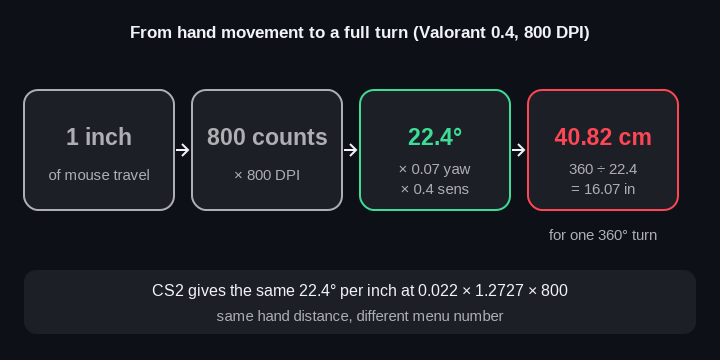
Worked example: Valorant 0.4 at 800 DPI, moving to Counter-Strike 2. The converter opens with exactly this example filled in.
Check the turn: 0.07 × 0.4 × 800 = 22.4° per inch of mouse travel, so a full turn takes 360 ÷ 22.4 = 16.07 in, or 40.82 cm. In CS2 at 1.2727 the same 800 DPI gives the same 40.82 cm. The eDPI jumps from 320 to 1018.2, and that is fine: eDPI is only comparable inside one game. Copy setting gives a console line such as sensitivity 1.27.
Why the same number feels different in every game
Your mouse does not send angles. It sends counts: at 800 DPI, one inch of travel is 800 counts. The game then turns your view by a fixed number of degrees per count at sensitivity 1. That constant is called yaw, and every engine picks its own. Your real turn per count is yaw × sens.
CS2, CS:GO, Apex Legends, Team Fortress 2, Titanfall 2 and Quake Champions all use 0.022. Valorant uses 0.07, which is 3.18 times bigger, so Valorant sens = CS2 sens ÷ 3.18. Overwatch 2 and current Call of Duty (BO6, MW3, Warzone) use 0.0066, which is 3.33 times smaller than 0.022, so their sens = CS2 sens × 3.33. That also means Apex copies 1:1 from CS2 and Overwatch 2 copies 1:1 to Call of Duty. A number that looks "high" in one game can be normal in another; more on that in what eDPI is and why it only compares inside one game.
Sensitivity converter table: CS2 values in other games
All at 800 DPI; each row is one hand distance per full turn.
| CS2 / Apex | cm/360 | Valorant | Overwatch 2 | Call of Duty | Fortnite X/Y | Siege (exact) |
|---|---|---|---|---|---|---|
| 1.0 | 51.95 | 0.3143 | 3.3333 | 3.3333 | 3.96 % | 3.8397 |
| 1.5 | 34.64 | 0.4714 | 5.0 | 5.0 | 5.94 % | 5.7596 |
| 2.0 | 25.98 | 0.6286 | 6.6667 | 6.6667 | 7.92 % | 7.6794 |
The All games table under the tool does the same for your own numbers, and a click on a row makes that game the new To. Siege values are exact; its slider takes whole numbers, see rounding below.
Changing DPI or buying a new mouse
DPI and sens trade one for one. Double the DPI, halve the sens, and the turn stays the same. The New DPI mode does this inside one game: CS2 1.6 at 400 DPI becomes 0.8 at 800 DPI (1.6 × 400 ÷ 800), and both give 64.94 cm/360. If you change game and mouse at the same time, stay in Game to game and tick Different DPI on the new setup. Classic mistake: a new mouse ships at 1600 or 3200 DPI, the old sens stays, and everything feels twice as fast. Check the DPI in the mouse software first.
Rounding: how many decimals to type
Type this rounds it with the Round to step you choose and shows the cm/360 the rounded number really gives. Back to the first example: 1.2727 rounded to 1.27 gives 40.91 cm instead of 40.82 cm, 0.88 mm longer, +0.21 %. Nobody feels that; I treat anything under 1 % as noise, and the tool only flags bigger gaps. With Round to at 1, the same example becomes 1 and the turn grows by 27.27 %, so the warning appears.
Low numbers are where rounding bites. CS2 1.0 is 0.3143 in Valorant; typing 0.31 makes the turn 1.38 % longer, while 0.314 is within 0.1 %. If the game accepts a third decimal, use it.
Rainbow Six Siege is the worst case. CS2 1.2 at 800 DPI is 4.6077 in Siege, and the menu slider takes only whole numbers. Round to locks to whole numbers for Siege, and slider 5 gives 39.90 cm instead of 43.30 cm: 3.40 cm shorter, 7.85 % faster. That you will feel. The fix is the ini route: keep the slider at 50 and set MouseSensitivityMultiplierUnit=0.001843 in GameSettings.ini (4.6077 × 0.02 ÷ 50). When Siege is the To game, the tool shows that GameSettings.ini line with six decimals and its own Copy button, while Copy setting gives the slider line, Mouse Sensitivity 5.
Games without a fixed number: PUBG, Battlefield, Rust, Roblox
You will not find these in the From and To lists, and that is deliberate; the last card there, + Custom game, jumps to the form for them. PUBG's menu slider is not linear. Battlefield ties sensitivity to field of view. For Rust the published constants disagree (0.1125, 0.1 and 0.00222 all circulate), and Roblox experiences can override the camera. There is no constant I trust for any of them, so the honest answer is to measure once with Custom game.
- In the game, set a known sens and note your DPI. Turn off mouse acceleration.
- Put a strip of tape on the mouse pad, line up the mouse edge with it, and park the crosshair on a sharp vertical edge.
- Move slowly in one direction until the same pixel is back under the crosshair. Measure the distance in cm. Do it three times and use the average.
- Fill in Game name, Sensitivity used, DPI used and Measured cm for one 360° turn, then press Add custom game.
The tool solves yaw = 360 × 2.54 ÷ (cm × sens × DPI). For 35 cm at sens 1 and 800 DPI that is 914.4 ÷ 28 000 = 0.032657 degrees per count. The game then appears in From, To and All games, works both ways, is stored only in your browser (up to 12 custom games), and Remove deletes it. Measuring tips and target ranges are in what a good cm/360 is and how to measure yours.
The yaw math behind every result
Everything above comes from one chain: inches per 360 = 360 ÷ (yaw × sens × DPI), cm/360 = inches × 2.54, and the converted sens keeps that distance equal: new sens = old sens × old yaw × old DPI ÷ (new yaw × new DPI). Counts per 360° is 360 ÷ (yaw × sens), which does not depend on DPI at all.
It assumes raw input, no mouse acceleration and hipfire only; ADS, scopes and field of view are why a perfect conversion can still feel off, see why your converted sensitivity feels different.
I only list a game when its yaw is confirmed by at least two independent references, mainly the yaw registry at keymap.io and the yaw list on csdb.gg; the Siege multiplier model comes from the long-running Siege thread on the mouse-sensitivity.com forums. The Yaw table under the tool shows every value with its source. These are the checks the converter has to pass:
| # | Input | Expected |
|---|---|---|
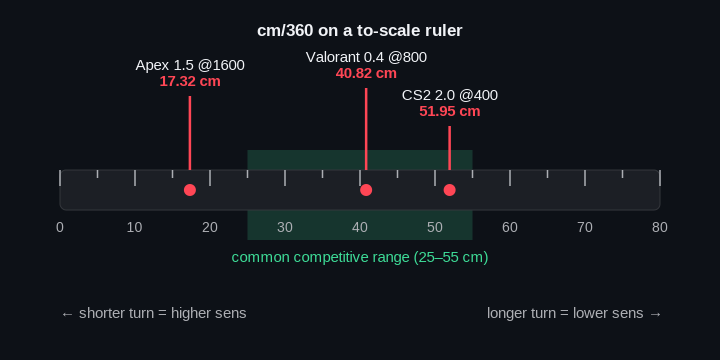
| 1 | Valorant 0.4, 800 DPI → CS2 | 1.2727; 40.82 cm; eDPI 320 → 1018.2 |
| 2 | CS2 2.0, 400 DPI → Valorant | 0.6286; 51.95 cm; 20.45 in |
| 3 | CS2 1.0, 800 DPI → Overwatch 2 | 3.3333; 16363.64 counts per 360° |
| 4 | Apex 1.5, 1600 DPI → Valorant | 0.4714; 17.32 cm |
| 5 | Overwatch 2 5, 800 DPI → Call of Duty | 5.0 |
| 6 | Valorant 0.35, 800 DPI → Fortnite | 4.41 %; 46.65 cm |
| 7 | CS2 1.2, 800 DPI → Siege | 4.6077; Type this 5 → 39.90 cm (−3.40 cm, −7.85 %); ini unit 0.001843 |
| 8 | New DPI: CS2 1.6, 400 → 800 DPI | 0.8 |
| 9 | Target cm/360 30, 800 DPI | Valorant 0.5443; CS2 1.7318 |
| 10 | Custom game: 35 cm at sens 1, 800 DPI | yaw 0.032657; then custom 2, 800 DPI → CS2 2.9688 (17.5 cm) |
| 11 | Case 1 with Round to 0.01 | Type this 1.27 → 40.91 cm (+0.88 mm, +0.21 %) |
Target cm/360 works backwards: 30 cm at 800 DPI gives Valorant 0.5443 and CS2 1.7318. The Turn ruler shows your number against the common competitive range (25–55 cm), Share link saves the setup in the address, and Reset brings back the example.
Quick answers
How do I convert Valorant sens to CS2?
Multiply your Valorant sens by 3.18 (0.07 ÷ 0.022) when the DPI stays the same. Valorant 0.4 at 800 DPI becomes CS2 1.2727, and both give 40.82 cm per full turn.
Is Apex sensitivity the same as CS2?
Yes. Apex Legends and CS2 both use 0.022 degrees per count, so the same number at the same DPI gives the same turn. Only your ADS settings in Apex need separate attention.
Is Overwatch sens the same as Call of Duty?
For current Call of Duty titles (BO6, MW3, Warzone) yes: both use 0.0066 degrees per count, so Overwatch 2 5.0 is Call of Duty 5.0 at the same DPI.
Does DPI affect the conversion?
Only if it changes. With the same DPI on both sides it cancels out. With a new mouse or a new DPI, enter both values, because doubling DPI needs half the sens for the same cm/360.
Does FOV affect sensitivity conversion?
Not the cm/360: a full turn is a full turn at any FOV. FOV changes how fast the picture seems to move, so the same cm/360 can look faster in a narrow view and slower in a wide one.
How many decimals should I copy?
Two decimals are enough for most values; the error stays well under 1 %. For low values such as Valorant 0.3143, type three decimals if the game accepts them, and for Siege use the ini multiplier instead of the whole-number slider.
Guides
 What is eDPI? How to calculate it and why it stays inside one gameThe formula, a step-by-step calculation, and why the same hand movement is 280 eDPI in Valorant but 891 in CS2.5-minute read
 What is a good cm/360? How to measure yours and pick a rangeMeasure your full-turn distance with tape and a ruler, then pick a range that fits CS2, Valorant, Apex or Overwatch 2.5-minute read
 Why your converted sensitivity feels different: FOV, ADS, scopesMatched cm/360 and it still feels off? FOV, ADS multipliers, acceleration and DPI stages explained, with a testing checklist.5-minute read
Updated